
CAS CaseConnector for SAP and Jira

Designing Efficient Application Integration

Designing Efficient Application Integration

CAS CaseConnector for SAP and Jira

Designing Efficient Application Integration

CAS CaseConnector for SAP and Jira

Centralized Access to All Business Objects

Agile Application Integration Thanks to a Unified Interface for Business Object Operations

Implement complex process synchronizations using events. Access all business objects in connected systems as if they were on a single system. Accelerate the development of modern user interfaces thanks to standardized object access routines and a unified object model.
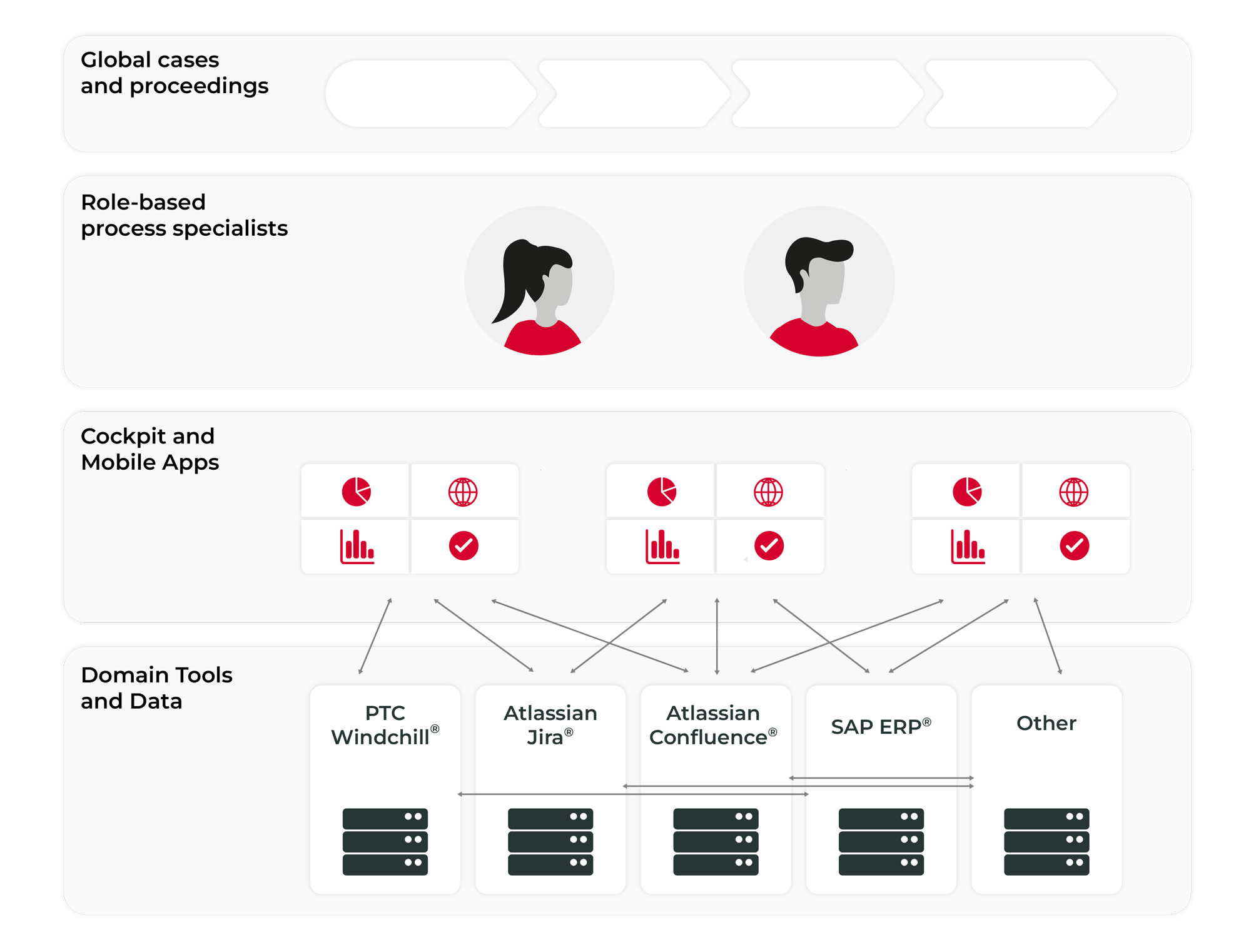
Centralized Access to All Business Objects
Agile Application Integration Thanks to a Unified Interface for Business Object Operations

Implement complex process synchronizations using events. Access all business objects in connected systems as if they were on a single system. Accelerate the development of modern user interfaces thanks to standardized object access routines and a unified object model.
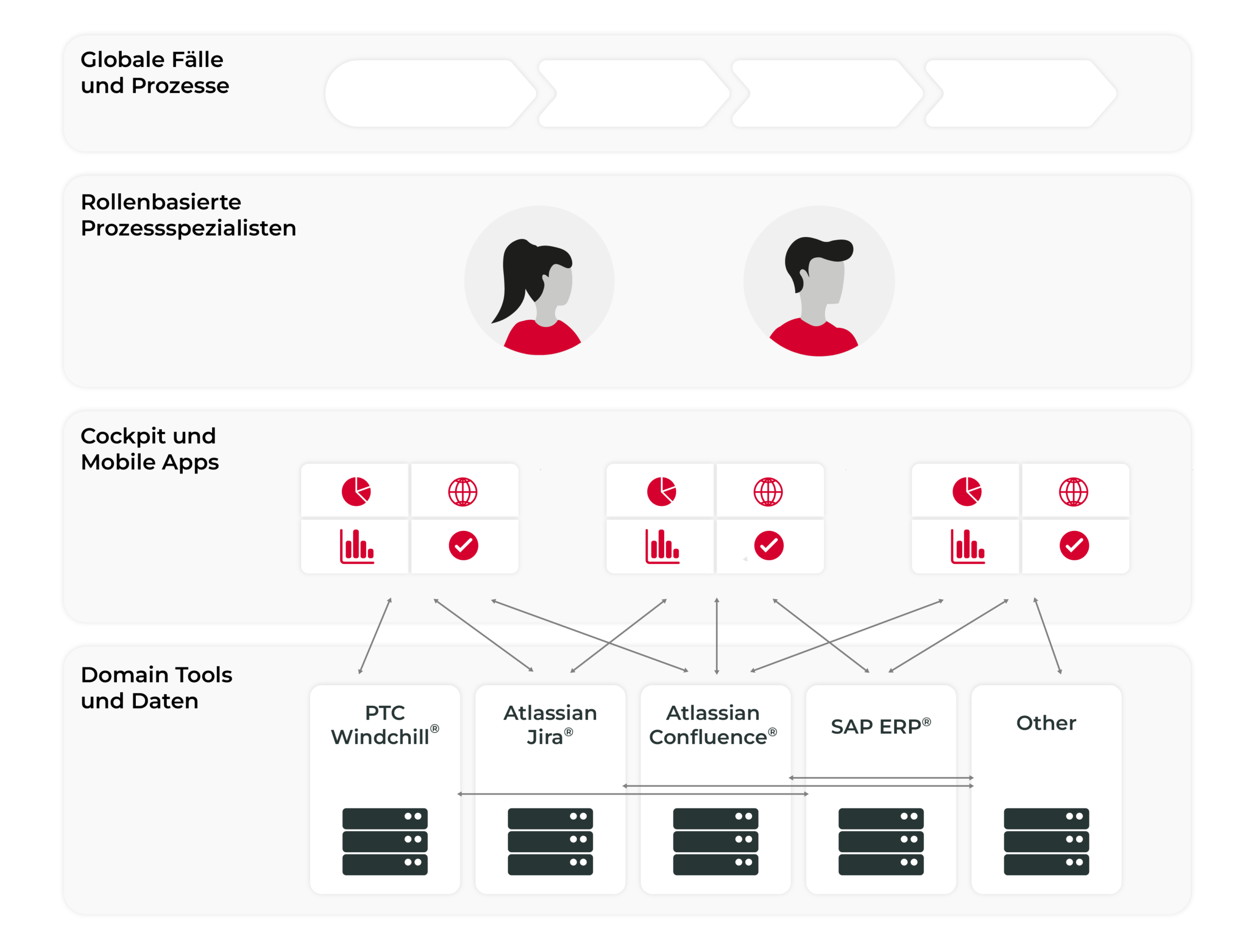
SAP Business Partner Chart
Centralized Access to All Business Objects
Agile Application Integration Thanks to a Unified Interface for Business Object Operations

Implement complex process synchronizations using events. Access all business objects in connected systems as if they were on a single system. Accelerate the development of modern user interfaces thanks to standardized object access routines and a unified object model.

Our expertise

Intelligently Connecting System Landscapes

Companies that use both SAP applications and Atlassian Jira are likely familiar with this problem: There is no automated data exchange between the applications, and data must be maintained manually.

CAS CaseConnector enables bidirectional data communication between SAP and Jira. This avoids redundant data, reduces the load on storage capacity, and prevents unnecessary system slowdowns. Companies that use CAS CaseConnector are therefore able to work more efficiently, as data is transferred seamlessly and made available across systems.

Your Benefits:

  • Simple Process Synchronization Using Events
  • Access to all business objects in the connected systems
  • Agile Software and Software Development
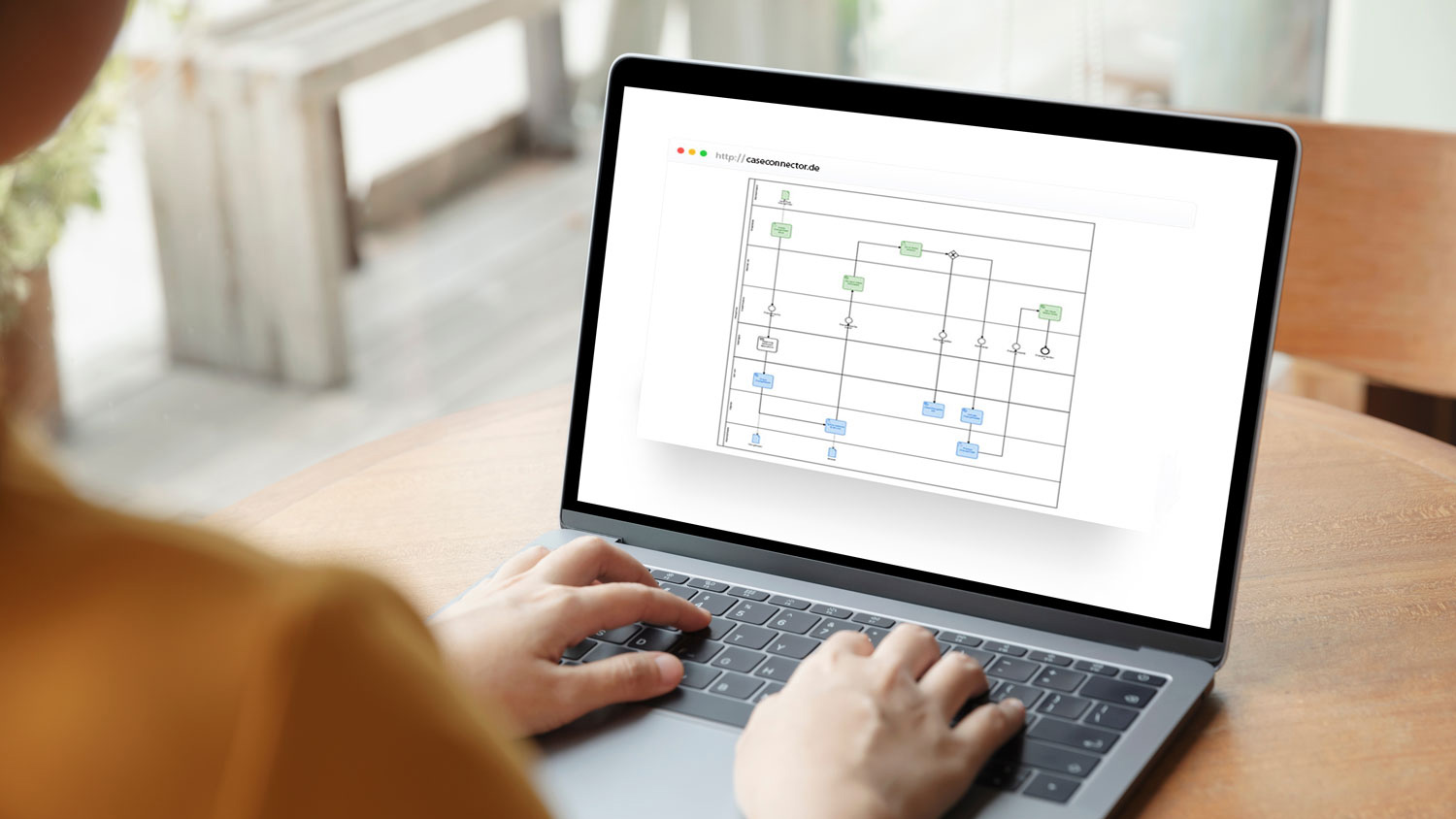
CAS CaseConnector System Integration

Implementing Process Integration in a Targeted Manner

CAS CaseConnector is a system integration solution that has already been successfully implemented for customers in the food retail and logistics industries. The solution is suitable for a variety of business needs and can be integrated quickly.

Watch our webcasts to learn how CAS CaseConnector automatically creates Jira issues for SAP tasks and assigns them individually. Learn how to synchronize processes between SAP and Jira and exchange data in both directions.

Our expertise

Intelligently Connecting System Landscapes

Companies that use both SAP applications and Atlassian Jira are likely familiar with this problem: There is no automated data exchange between the applications, and data must be maintained manually.

CAS CaseConnector enables bidirectional data communication between SAP and Jira. This avoids redundant data, reduces the load on storage capacity, and prevents unnecessary system slowdowns. Companies that use CAS CaseConnector are therefore able to work more efficiently, as data is transferred seamlessly and made available across systems.

Your Benefits:

  • Simple Process Synchronization Using Events
  • Access to all business objects in the connected systems
  • Agile Software and Software Development
CAS CaseConnector System Integration with SAP and Jira

Implementing Process Integration in a Targeted Manner

CAS CaseConnector is a system integration solution that has already been successfully implemented for customers in the food retail and logistics industries. The solution is suitable for a variety of business needs and can be integrated quickly.

Watch our webcasts to learn how CAS CaseConnector automatically creates Jira issues for SAP tasks and assigns them individually. Learn how to synchronize processes between SAP and Jira and exchange data in both directions.

Our expertise

Intelligently Connecting System Landscapes

Companies that use both SAP applications and Atlassian Jira are likely familiar with this problem: There is no automated data exchange between the applications, and data must be maintained manually.

CAS CaseConnector enables bidirectional data communication between SAP and Jira. Companies that use CAS CaseConnector are therefore able to work more efficiently, as data is transferred seamlessly and made available across systems.

Your Benefits:

  • Simple Process Synchronization Using Events
  • Access to all business objects in the connected systems
  • Agile Software and Software Development
Implementing Process Integration in a Targeted Manner

CAS CaseConnector is a system integration solution that has already been successfully implemented for customers in the food retail and logistics industries. The solution is suitable for a variety of business needs and can be integrated quickly.

Watch our webcasts to learn how CAS CaseConnector automatically creates Jira issues for SAP tasks and assigns them individually. Learn how to synchronize processes between SAP and Jira and exchange data in both directions.

Take Advantage of Our Range of Services
SAP Controlling

Managing Tasks in Jira and Tracking Costs in SAP

  • SAP CO orders are created to track the costs of tasks.
  • When creating a task (an issue) in Jira, an SAP CO order is assigned to the issue.
  • To assist with this mapping, Jira provides a search tool in the form of a list that searches for and displays applicable SAP CO orders.
  • The content for the list is retrieved synchronously from the SAP system.
  • Tasks are managed in terms of time and personnel using issues in Jira.
  • Completing the tasks involves costs in the form of time or financial resources.
  • Both types of effort are documented in Jira, and in the case of time-based effort, a conversion factor is applied.
  • The total cost of a task is posted to the SAP CO order as soon as the task reaches a defined status.

SAP Engineering Change Management

Managing an Engineering Change Management Process in SAP Using Jira

  • As part of an overarching engineering change management project managed in Jira, task packages are assigned to various departments.
  • At a specified time, the design department is tasked with developing a proposal for a change and determining the costs.
  • To do this, a ChangeOrder issue is created in Jira.
  • The “Issue created” event triggers the automatic creation and initiation of a change request in SAP.
  • As part of the change order, the affected items are identified, and the costs are calculated based on that.
  • The change request is then set to the “calculated” status, which also sets the corresponding issue to the “calculated” status and notifies the person in charge.
  • The person in charge can now view the results of the proposal, including the costs, directly in Jira and decide whether or not to implement the change.
  • The following status changes for the respective objects are synchronized until the process is complete.
SAP Project System

Track time spent in Jira using a worklog and bill it in SAP

  • In SAP, projects are defined using PSP elements.
  • Selected PSP elements are available to employees for billing in CATS.
  • In Jira, issues are created and assigned to PSP elements from SAP.
  • For assignment purposes, Jira provides a selector that displays billable PSP elements synchronized from SAP in a tree-like structure that mirrors the project structure.
  • The content for the structural ads is retrieved synchronously from SAP.
  • The effort associated with an issue is recorded in Jira as work logs.
  • The recorded expenses are posted in SAP CATS to the PSP element that was assigned to the Jira issue.
  • If the assignment of an issue to a PSP element is changed in Jira, all postings in SAP that were previously assigned to the old PSP element are deleted and reposted to the new PSP element.
  • If the assignment of an issue to a WBS element is deleted in Jira, all postings to that WBS element are deleted in SAP.
SAP Plant Maintenance

Record, process, and coordinate tasks in Jira; document and monitor costs in SAP

  • A work order is created by creating a defined issue in Jira.
  • As a result, a notification and an associated work order are automatically created in SAP PM.
  • The installation is performed asynchronously.
  • If the entry is successful, the Jira system is notified so that Jira can retrieve the order number from SAP and assign it.
  • If an error occurs, the Jira system is notified via an event.
  • Jira creates a comment on the assigned issue and notifies the responsible employee via email.
  • Once the order has been entered into SAP, processing begins.
  • Over time, costs are posted to the order in SAP.
  • The costs are displayed directly on the issue in Jira, broken down into external, internal, and material costs.
  • Dates are subject to change during the order processing.
  • Dates are adjusted in Jira on the issue.
  • The order in SAP will be updated accordingly.
  • If the order issue is released or closed, the order is automatically updated in SAP.
  • Estimated costs for the order are maintained in Jira and are then transferred to SAP.
  • Depending on the project status, closing the task, approving it, or marking it as partially complete in SAP can be initiated directly from Jira.
  • Error messages that occur in SAP can be posted as comments on the issue in Jira.
SAP Product Lifecycle Management

Involving Jira Users in a Cross-System Material Master Creation Process

  • Creating new material master records in the Product Lifecycle Management (PLM) system involves a complex process that requires the participation of various departments.
  • Some of the employees in the departments involved work exclusively in Jira and are expected to maintain the information relevant to the process there as well.
  • For all tasks (HumanTasks) in the process that are to be handled in Jira, issues are created and assigned in Jira via the interface.
  • All information relevant to the process handler is displayed directly in Jira, so the task can be completed entirely within Jira.
  • Project-specific checklists for optimizing the process flow are generated in Confluence using templates and made available to the users.
  • Process documentation is maintained in Confluence and can be viewed directly within the process workflow.

SAP Solution Manager

SAP Solution Manager and Jira are optimally integrated to enable more efficient workflows

  • In SAP Solution Manager, the project team defines and documents requirements for systems and applications, for example, as part of discovery workshops.
  • For all requirements that are to be tracked and implemented, the architect in charge of the project team creates work packages in SAP Solution Manager and the necessary work items for each work package.
  • In Jira, an epic is automatically created and synchronized for each work package.
  • The corresponding work items are transferred to Jira as user stories via the interface and assigned to the appropriate epic.
  • Relevant status changes to user stories are synchronized.

Take Advantage of Our Range of Services

SAP Controlling

Managing Tasks in Jira and Tracking Costs in SAP

  • SAP CO orders are created to track the costs of tasks.
  • When creating a task (an issue) in Jira, an SAP CO order is assigned to the issue.
  • To assist with this mapping, Jira provides a search tool in the form of a list that searches for and displays applicable SAP CO orders.
  • The content for the list is retrieved synchronously from the SAP system.
  • Tasks are managed in terms of time and personnel using issues in Jira.
  • Completing the tasks involves costs in the form of time or financial resources.
  • Both types of effort are documented in Jira, and in the case of time-based effort, a conversion factor is applied.
  • The total cost of a task is posted to the SAP CO order as soon as the task reaches a defined status.
SAP Engineering Change Management

Managing an Engineering Change Management Process in SAP Using Jira

  • As part of an overarching engineering change management project managed in Jira, task packages are assigned to various departments.
  • At a specified time, the design department is tasked with developing a proposal for a change and determining the costs.
  • To do this, a ChangeOrder issue is created in Jira.
  • The “Issue created” event triggers the automatic creation and initiation of a change request in SAP.
  • As part of the change order, the affected items are identified, and the costs are calculated based on that.
  • The change request is then set to the “calculated” status, which also sets the corresponding issue to the “calculated” status and notifies the person in charge.
  • The person in charge can now view the results of the proposal, including the costs, directly in Jira and decide whether or not to implement the change.
  • The following status changes for the respective objects are synchronized until the process is complete.
SAP Project System

Track time spent in Jira using a worklog and bill it in SAP

  • In SAP, projects are defined using PSP elements.
  • Selected PSP elements are available to employees for billing in CATS.
  • In Jira, issues are created and assigned to PSP elements from SAP.
  • For assignment purposes, Jira provides a selector that displays billable PSP elements synchronized from SAP in a tree-like structure that mirrors the project structure.
  • The content for the structural ads is retrieved synchronously from SAP.
  • The effort associated with an issue is recorded in Jira as work logs.
  • The recorded expenses are posted in SAP CATS to the PSP element that was assigned to the Jira issue.
  • If the assignment of an issue to a PSP element is changed in Jira, all postings in SAP that were previously assigned to the old PSP element are deleted and reposted to the new PSP element.
  • If the assignment of an issue to a WBS element is deleted in Jira, all postings to that WBS element are deleted in SAP.
SAP Plant Maintenance

Record, process, and coordinate tasks in Jira; document and monitor costs in SAP

  • A work order is created by creating a defined issue in Jira.
  • As a result, a notification and an associated work order are automatically created in SAP PM.
  • The installation is performed asynchronously.
  • If the entry is successful, the Jira system is notified so that Jira can retrieve the order number from SAP and assign it.
  • If an error occurs, the Jira system is notified via an event.
  • Jira creates a comment on the assigned issue and notifies the responsible employee via email.
  • Once the order has been entered into SAP, processing begins.
  • Over time, costs are posted to the order in SAP.
  • The costs are displayed directly on the issue in Jira, broken down into external, internal, and material costs.
  • Dates are subject to change during the order processing.
  • Dates are adjusted in Jira on the issue.
  • The order in SAP will be updated accordingly.
  • If the order issue is released or closed, the order is automatically updated in SAP.
  • Estimated costs for the order are maintained in Jira and are then transferred to SAP.
  • Depending on the project status, closing the task, approving it, or marking it as partially complete in SAP can be initiated directly from Jira.
  • Error messages that occur in SAP can be posted as comments on the issue in Jira.
SAP Product Lifecycle Management

Involving Jira Users in a Cross-System Material Master Creation Process

  • Creating new material master records in the Product Lifecycle Management (PLM) system involves a complex process that requires the participation of various departments.
  • Some of the employees in the departments involved work exclusively in Jira and are expected to maintain the information relevant to the process there as well.
  • For all tasks (HumanTasks) in the process that are to be handled in Jira, issues are created and assigned in Jira via the interface.
  • All information relevant to the process handler is displayed directly in Jira, so the task can be completed entirely within Jira.
  • Project-specific checklists for optimizing the process flow are generated in Confluence using templates and made available to the users.
  • Process documentation is maintained in Confluence and can be viewed directly within the process workflow.
SAP Solution Manager

SAP Solution Manager and Jira are optimally integrated to enable more efficient workflows

  • In SAP Solution Manager, the project team defines and documents requirements for systems and applications, for example, as part of discovery workshops.
  • For all requirements that are to be tracked and implemented, the architect in charge of the project team creates work packages in SAP Solution Manager and the necessary work items for each work package.
  • In Jira, an epic is automatically created and synchronized for each work package.
  • The corresponding work items are transferred to Jira as user stories via the interface and assigned to the appropriate epic.
  • Relevant status changes to user stories are synchronized.

When You Work with Us , You’ll Get:

Advantages

  • Universal REST API for Business Object Operations
  • Unified Object Model
  • Ready-made connectors are available not only for SAP but also for Atlassian Jira, PTC Windchill, and CustomX

Features

  • Development Accelerators for Services and User Interfaces
  • Reduces redundancy and enables the delivery of live data
  • Configurable Synchronizer

Technology

  • Restful Web Services for Cross-System Communication
  • JSON Format for Compact Data Exchange
  • SAP Add-On in Its Own Namespace
When You Work With Us, You’ll Get:

Advantages

  • Universal REST API for Business Object Operations
  • Unified Object Model
  • Ready-made connectors are available not only for SAP but also for Atlassian Jira, PTC Windchill, and CustomX

Features

  • Development Accelerators for Services and User Interfaces
  • Reduces redundancy and enables the delivery of live data
  • Configurable Synchronizer

Technology

  • Restful Web Services for Cross-System Communication
  • JSON Format for Compact Data Exchange
  • SAP Add-On in Its Own Namespace
When You Work With Us, You’ll Get:

Advantages

  • Universal REST API for Business Object Operations
  • Unified Object Model
  • Ready-made connectors are available not only for SAP but also for Atlassian Jira, PTC Windchill, and CustomX

Features

  • Development Accelerators for Services and User Interfaces
  • Reduces redundancy and enables the delivery of live data
  • Configurable Synchronizer

Technology

  • Restful Web Services for Cross-System Communication
  • JSON Format for Compact Data Exchange
  • SAP Add-On in Its Own Namespace
Frequently Asked Questions

FAQ Application Integration

1. What is Enterprise Application Integration (EAI)?

Enterprise Application Integration (EAI) connects various enterprise applications so that data and processes can be exchanged and synchronized across systems. This reduces manual effort and enables end-to-end business processes.

2. What are data silos?

Data silos arise when data is stored separately in different applications and cannot be exchanged automatically. Application integration connects these systems and ensures a seamless flow of data.

3. What is application integration, and why is it important?

Application integration connects different applications and data sources to create end-to-end processes. It ensures that information is exchanged automatically and that data and processes are available across systems.

4. What are the benefits of application integration?

Application integration creates greater transparency, as data is quickly available and can be analyzed company-wide. It eliminates data silos by enabling different applications to exchange information reliably. At the same time, it reduces IT complexity through end-to-end processes and helps companies respond more quickly to new requirements and changes.

5. How does application integration work with CAS CaseConnector?

CAS AG has developed a system integration solution that is suitable for all companies and can be implemented quickly. CAS CaseConnector enables bidirectional data communication, which eliminates redundant data and reduces process execution times.


Frequently Asked Questions

FAQ Application Integration

1. What is Enterprise Application Integration (EAI)?

Enterprise Application Integration (EAI) connects various enterprise applications so that data and processes can be exchanged and synchronized across systems. This reduces manual effort and enables end-to-end business processes.

2. What are data silos?

Data silos arise when data is stored separately in different applications and cannot be exchanged automatically. Application integration connects these systems and ensures a seamless flow of data.

3. What is application integration, and why is it important?

Application integration connects different applications and data sources to create end-to-end processes. It ensures that information is exchanged automatically and that data and processes are available across systems.

4. What are the benefits of application integration?

Application integration creates greater transparency, as data is quickly available and can be analyzed company-wide. It eliminates data silos by enabling different applications to exchange information reliably. At the same time, it reduces IT complexity through end-to-end processes and helps companies respond more quickly to new requirements and changes.

5. How does application integration work with CAS CaseConnector?

CAS AG has developed a system integration solution that is suitable for all companies and can be implemented quickly. CAS CaseConnector enables bidirectional data communication, which eliminates redundant data and reduces process execution times.

Frequently Asked Questions

FAQ Application Integration

1. What is Enterprise Application Integration (EAI)?

Enterprise Application Integration (EAI) connects various enterprise applications so that data and processes can be exchanged and synchronized across systems. This reduces manual effort and enables end-to-end business processes.

2. What are data silos?

Data silos arise when data is stored separately in different applications and cannot be exchanged automatically. Application integration connects these systems and ensures a seamless flow of data.

3. What is application integration, and why is it important?

Application integration connects different applications and data sources to create end-to-end processes. It ensures that information is exchanged automatically and that data and processes are available across systems.

4. What are the benefits of application integration?

Application integration creates greater transparency, as data is quickly available and can be analyzed company-wide. It eliminates data silos by enabling different applications to exchange information reliably. At the same time, it reduces IT complexity through end-to-end processes and helps companies respond more quickly to new requirements and changes.

5. How does application integration work with CAS CaseConnector?

CAS AG has developed a system integration solution that is suitable for all companies and can be implemented quickly. CAS CaseConnector enables bidirectional data communication, which eliminates redundant data and reduces process execution times.

Excerpt from Our Project Examples

Excerpt from Our Project Examples

Excerpt from Our Project Examples

Get the CAS CaseConnector today!

More information Request

Her focus

I have read the privacy policy and consent to the collection, processing, and use of my data, as well as to CAS AG sending me additional content via email and contacting me by phone. I can revoke my consent at any time by unsubscribing or sending an email to info@c-a-s.de .

*Required field

7 - 2 = ?

Please enter the characters shown in the CAPTCHA to verify that you are human.

Contact Contact Us

Feel free to schedule a personal consultation!

Thorben Weber, Account Manager, CAS AG

+49 152 016 766 24

thorben.weber@c-a-s.de